

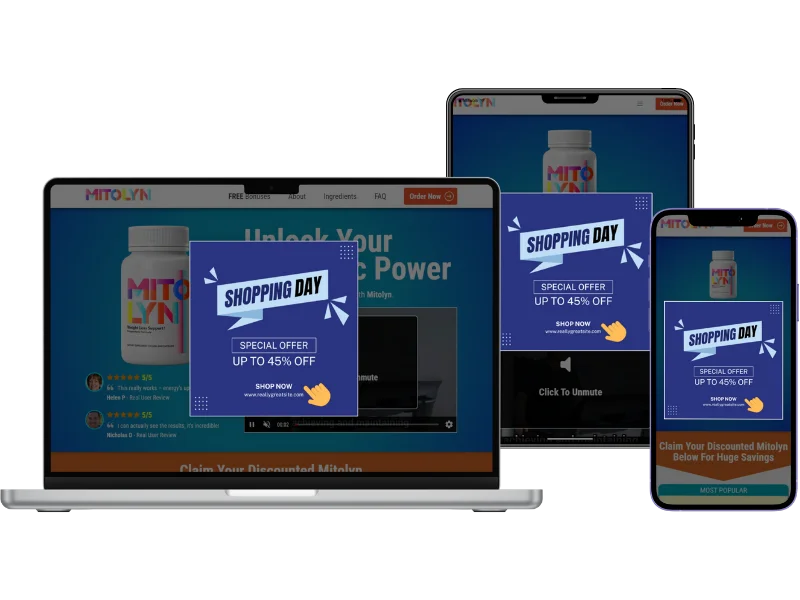
To make a banner presell page you need three things: a finished creative (usually built in Canva), a page that displays that image with an exit button pointing to the offer, and a custom domain that loads fast. This guide covers when the banner model works, how to build it step by step, and the mistakes that get affiliate campaigns disapproved on Google Ads.
A banner presell page is a bridge page whose central element is a single image — usually a promotional creative made in Canva or Photoshop — that is either clickable or paired with a button sending the visitor to the vendor's sales page. It does not rely on long-form copy: the entire message lives inside the visual.
Why do affiliates use banner presell pages on Google Ads?
If you run Search campaigns, you usually cannot send paid traffic straight to a raw affiliate link — Google treats it as a low-value destination and either disapproves the ad or tanks your Quality Score. A presell page fixes that by adding a step you actually own before the offer. And of every presell model available, the banner is the fastest to produce: an affiliate who already has the campaign creative can publish a live page in minutes without writing a single new line of copy.
There is a media reason too. In visual niches — physical products, fashion, beauty, discounted offers, Cash on Delivery — the image sells better than the paragraph. The visitor sees the price, the before-and-after or the product packaging and decides in two seconds. Forcing an editorial article into that context often adds friction instead of removing it.
When the banner model is the right call (and when it is not)
The banner shines when the creative already carries the promise. It is a poor choice when the product needs context, proof or education before the offer — in those cases quiz or review models perform better because they build an argument before the click.
- Use a banner when you already have an approved creative and want to test fast
- Use a banner when the niche is visual (physical products, beauty, electronics, CoD)
- Use a banner when the offer is a promotion with an obvious price, coupon or discount
- Avoid a banner when the product is expensive and needs objection handling first
- Avoid a banner in sensitive niches (health, finance) that require editorial context
- Avoid a banner when you need to qualify the lead before sending them to the offer
How to make a banner presell page step by step
Five steps, from the creative to tracking. The logic applies to whatever tool you use to publish.
1. Build the creative in the right format
Design vertical or square — most affiliate traffic arrives on mobile. Safe formats are 1080x1350px or 1080x1080px, exported as JPG or PNG under 300 KB. A 2 MB export straight out of Canva is the number one cause of slow banner presell pages.
2. Make the promise readable without zooming
Small text inside an image disappears on a phone. Keep only the essentials at large size: product name, main benefit and the action trigger (price, discount, deadline). If you need more than three text blocks inside the creative, the banner model is probably wrong for that offer.
3. Upload the image and set the destination
The page shows the image and an exit button to the destination link: your sales page or your affiliate link from ClickBank, Digistore24, MaxWeb, AdCombo or BuyGoods. The image must be responsive and the exit button must point to the right offer.
4. Publish on a custom domain
Never run a banner presell page on a generic subdomain shared with hundreds of other affiliates. Use a domain you own, with SSL active. A custom domain also makes the display URL in your ad look legitimate.
5. Set up tracking before the campaign goes live
A live page with no conversion tracking is blind spend. When the sale recorded on the affiliate platform is sent to Google Ads as a conversion, the algorithm optimizes for real revenue instead of raw clicks.
The most common banner presell mistake is image weight. A high-quality Canva export can exceed 2 MB and push LCP past 4 seconds on 4G — Google penalizes that directly in Quality Score and the visitor bounces before the page paints. Always compress the creative and serve the page through a CDN.
Presell pages served over a CDN with images compressed under 300 KB typically reach an LCP below 2.5 seconds on mobile — the threshold Google recommends for a good experience. Pages that cross that line tend to lose sessions before the content even appears.
Frequently asked questions about banner presell pages
Are banner presell pages allowed on Google Ads?
Yes, as long as the page has a clear destination, does not mislead visitors about what comes after the click, and complies with the content policy for your niche. What gets campaigns disapproved is not the banner format itself but exaggerated claims inside the creative, automatic redirects, or missing privacy and contact pages.
What is the ideal banner size for a presell page?
Go with 1080x1350px (vertical) or 1080x1080px (square) for mobile traffic, exported as JPG under 300 KB. Very wide formats such as 1920x1080 shrink too much on phones and make the text unreadable.
Do I need coding skills to build a banner presell page?
No. The page is just an image and an exit button. With a tool that builds and publishes the page, the process is: upload the creative, paste the link, publish.
Does a banner presell convert better than a review presell?
It depends on the niche. Banners tend to win on visual, fast-decision offers such as discounted physical products. Review pages usually win in nutra and in products that require proof before purchase. The right move is to run both models on the same budget and let the data decide.
Conclusion
The banner presell page is the most direct model in an affiliate's toolkit: a strong creative, an exit button and a fast page on a custom domain. It wins on production speed and in visual niches, and loses where the product demands an argument before the offer. What actually decides the result is not how pretty the creative is, but the technical layer around it — image weight, load speed, custom domain and tracked conversions. Solve those four and the banner becomes one of the cheapest ways to test a new offer on Google Ads.
 AdsXEverything you need to sell as an affiliate
If you want to turn your Canva creative into a presell
AdsX has over 5,000 users and publishes your banner presell on your own domain, fast, with every sale tied to the ad.
More on Bridge page
 AdsX in Claude and ChatGPT: You Ask, Your Operation Runs
 Is ClickBank Accelerator Worth It? Cost and Reviews
 LanderLab Review: Pricing, AI Credits and Limits