

To know which Google Ads account drove each sale, add a custom parameter to each account's Final URL suffix, like c=account1 in one and c=account2 in the other. It travels with the click to checkout and arrives in the sale postback.
Final URL suffix: a field under the Ad URL options, in the ad editor in Google Ads, where you append extra parameters to the end of your ad's destination URL. Anything you put there is automatically attached to the link on every click from that ad — without changing the display URL or affecting ad approval.
Why do affiliates run more than one Google Ads account?
It's common for affiliates to separate operations: one account per niche, one per product, or separate accounts by currency and country. The problem shows up when it's time to measure results. Your affiliate network — ClickBank, Digistore24, MaxWeb, AdCombo — records the sale, but it doesn't tell you which account the click came from. Without that, you can't tell which operation is profitable and which one is just burning budget.
Without that separation, scaling decisions become guesswork. You might increase spend on the wrong account — or pause the one that was actually converting.
How do you identify which Google Ads account each sale came from?
The solution is to tag each account with its own fixed parameter. Here is the full path:
- You pick a short identifier for each account — e.g., c=account1 for the first, c=account2 for the second
- You add that identifier to the Final URL suffix field in each account's ads
- A user clicks your ad and the parameter is appended to your presell URL automatically
- Your presell page passes the parameter along to the affiliate network's checkout link
- When the sale happens, the network sends the parameter in the postback
- The parameter shows up in the sale data your tracker receives, and you know which account drove it
Step by step: setting up the Final URL suffix
1. Open the ad editor
In Google Ads, log into the first account, open the campaign, and click to edit the ad. Scroll down to the "Ad URL options" section and find the Final URL suffix field.
2. Add your identifier parameter
Type the parameter in name=value format, with no spaces. Example: c=account1. Save the ad. If the account has more than one ad, repeat it in each — the value can be the same for every ad in the same account.
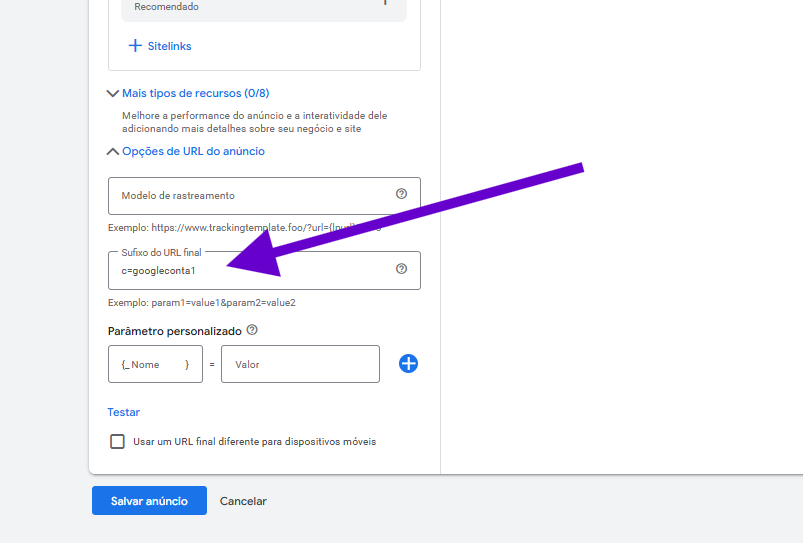
3. Repeat in the other accounts with different values
Log into the second account and apply the same setting, changing only the value: c=account2. In the third, c=account3, and so on. The parameter name (c) stays the same everywhere — the value is what identifies each account.
4. Check the parameter in the sale data
When a sale is recorded, open the data the network sent in the postback. Your account identifier appears there, sometimes under another field name (subid2, tid, aff_sub), depending on the network.
Three things to watch: use short values with no spaces or special characters (account1, not "account 1"); never reuse parameter names Google Ads already relies on, such as gclid or utm_source — that can conflict with tracking; and the tag only applies to sales made after the setup — past sales cannot be identified retroactively.
Where does the parameter usually get lost?
Between the presell and the checkout. If the presell doesn't pass the parameter to the affiliate link, it disappears and the sale arrives with no origin.
- A presell that passes URL parameters on to the checkout link.
- An affiliate link with a sub ID the network returns in the postback.
- A tracker that receives the postback and keeps every field of the sale.
One fixed parameter per account in the Final URL suffix identifies the origin of every new tracked sale, with no scripts and no change to campaign structure.
Frequently Asked Questions about multi-account tracking
Can I use the same method to separate campaigns instead of accounts?
Yes. The logic is identical: instead of one value per account, use one value per campaign, set in that campaign's ads (e.g., c=weight-loss-campaign). Each campaign then carries its own identifier.
Does the extra parameter affect ad approval?
No. The Final URL suffix is an official Google Ads feature built precisely for adding tracking parameters. It doesn't change your display URL or the ad's real destination — it only appends information to the end of the link.
What if I forget to set it up in one of my accounts?
Sales from that account will arrive without the identifier — you'll still see them, just without a known origin. In practice, the missing parameter already hints the sale came from the unconfigured account, but tagging all of them is the safer play.
Does this work with any affiliate network?
It works with networks that include tracking parameters in the sale postback — such as ClickBank, Digistore24, MaxWeb, AdCombo and BuyGoods. The parameter enters the checkout link and arrives with the sale notification.
Conclusion: one simple parameter answers the question
Knowing which Google Ads account drove each sale doesn't require a new tool or technical skills. One fixed parameter in each account's Final URL suffix, different values across accounts, and the answer shows up in each sale's data. Set it up once and every new sale arrives with its origin already tagged.
 AdsXEverything you need to sell as an affiliate
If you want to know which account drove every sale
AdsX has over 5,000 users and shows, on every sale, the account and the ad that brought it, with no code.
More on Affiliate tracking
 ClickBank Tracking Pixel for Google Ads
 Why Google Ads Can't See Your Sweeply Sales (and the Fix)
 Google Ads Conversion Tracking for Affiliates